
There's a particular frustration that most field ecologists know well: you're back at the desk, staring at a spreadsheet full of handwritten data and something doesn't add up. A species name is wrong, a coordinate is missing and the survey was three weeks ago. The window to fix it has long closed.
QGIS and Mergin Maps change where that problem gets caught, from the desk months later to the field the moment it happens. Together, they give ecological teams a complete data collection workflow that's offline-ready, spatially precise and built around how surveys actually run. This guide walks you through how it works.
How QGIS and Mergin Maps work together
QGIS is where you build your survey, with layers, forms, symbology and basemaps. Mergin Maps puts that exact project on your team’s phones and keeps it fully functional offline. When you sync, your field data comes straight back into QGIS with no conversion, no reformatting and no intermediary steps.
The bridge between the two is the Mergin Maps QGIS plugin. You design your project on the desktop, upload it via the plugin and field workers download it to their devices. Everything you configured, from dropdown menus to validation rules and map styling, appears identically on the mobile app. That's because the app runs on the QGIS rendering engine directly.
When multiple users sync their edits, the platform uses a library called Geodiff to merge changes at the feature level automatically. It's the kind of thing that sounds technical but makes an immediate practical difference when coordinating a team across a large survey area.

Features that matter most to ecologists
Offline first architecture for remote fieldwork
Before you leave the car park, you download the project to your device and confirm everything is going well. From that point, you can collect data for as long as your survey runs without any signal, then sync everything in one go once you're back in range. No mid-survey scramble for a data bar, no lost records.
Mergin Maps is built to work fully offline, right out of the box. And with support for offline background maps, you'll always know exactly where you are, even when the network doesn't.
Custom forms for ecological surveys
Rather than typing Circus cyaneus from memory in a blustering wind, your surveyor picks it from a searchable dropdown built from your own species table, complete with codes, common names and scientific names. If something unexpected turns up, they can add an unlisted species on the spot without breaking the workflow.
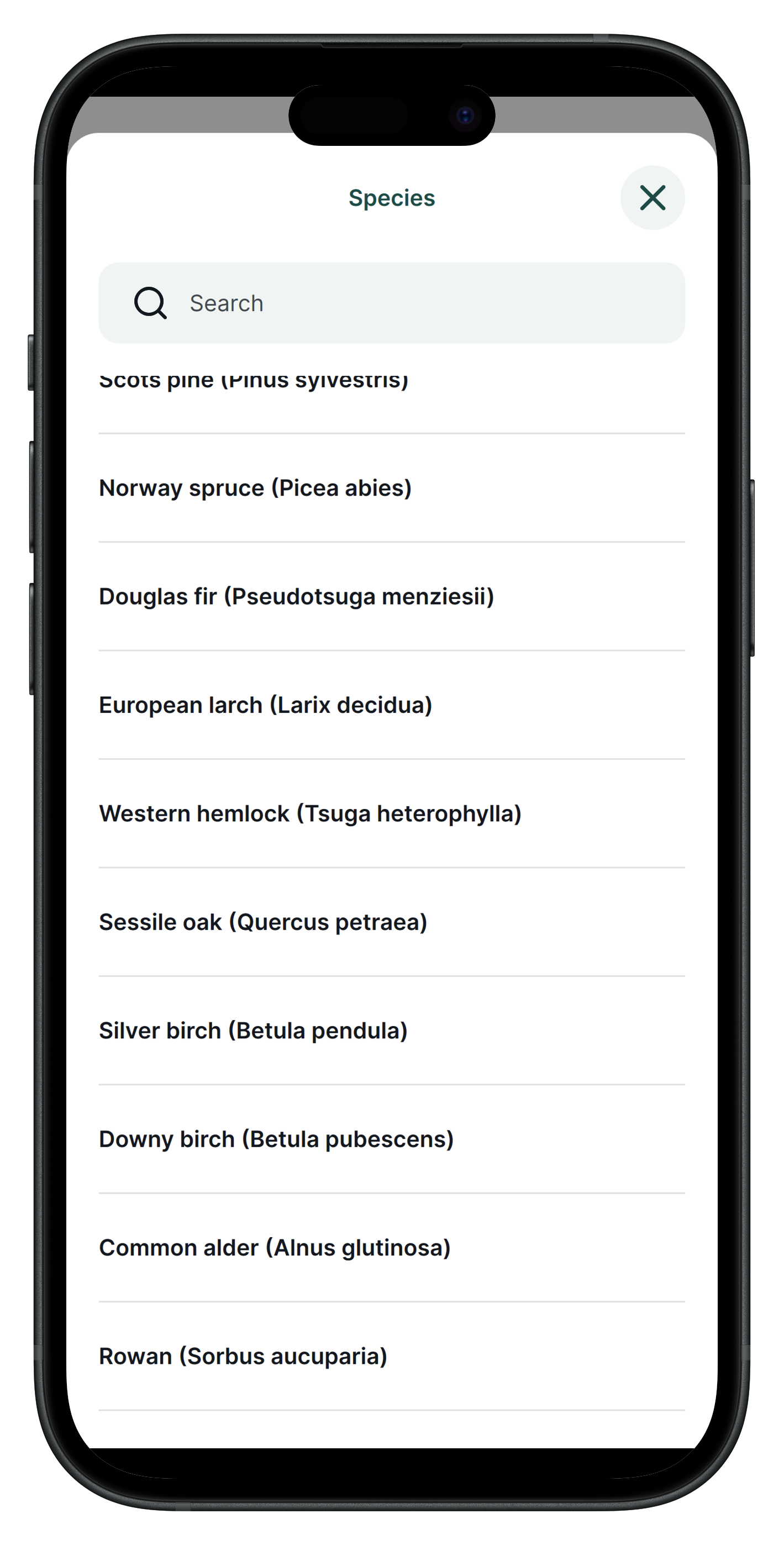
Habitat classifications work the same way. Select "Grassland" and the next field automatically filters down to relevant sub-types, rather than presenting the entire classification scheme at once.
Validation rules catch incomplete records before the surveyor moves on, either blocking the entry entirely or flagging a warning, depending on how critical the field is. Photos attach directly to each record with location data embedded, and there's no limit on how many you can add per observation.
Precise digitisation
Capturing geometries often takes place relative to other features. With Mergin Maps, you can digitise a hedge snapped to an existing road geometry, or enable topological editing to quickly capture polygons with no overlapping. You can also split an existing line or polygon or redraw and reshape it, without losing your recorded attributes.
Spatial data types for all scenarios
Points with photos, lines and polygons cover the full range of what ecological surveys actually need, from a single species observation, to a walked transect, to a mapped habitat patch. You configure symbology in QGIS on the desktop, and they appear exactly as designed on the device in the field. You can synchronise it back into QGIS with one click, so you don’t need to spend hours sending files or uploading it manually.
External GNSS devices
When your phone's built-in GPS isn't accurate enough, Mergin Maps connects to external GNSS receivers via Bluetooth. This gives you centimetre-level accuracy for surveys where precision matters, such as boundary delineation or invasive species mapping in dense vegetation.
The app displays your real-time position and accuracy reading so your surveyor always knows whether the signal is reliable enough to record. Most major receivers are supported, so you're not locked into specific hardware.
Team collaboration, version control and conflict resolution
When two surveyors sync from different corners of the same site, the platform merges their edits automatically at the feature level, with no manual reconciliation required. Every sync is recorded, so you have a complete audit trail if you need to demonstrate survey effort for a planning application or compliance report.
You control who can collect data and who can edit the underlying project, which matters when you're coordinating a mix of staff and volunteers. Unlimited read-only members are included for free on all plans.
Step-by-step: from desktop to field and back
- Project preparation in QGIS: Set up your layers, coordinate systems, snapping configurations and styling on the desktop.
- Install Mergin Maps plugin: Connect your QGIS interface directly to the cloud environment.
- Configure forms and layers: Design smart dropdowns and validation rules to ensure data quality.
- Cloud sync and mobile download: Upload the project from your PC and open it on your mobile device.
- Field data collection: Capture points, lines, or polygons and attach photos, even offline.
- Sync back and analysis in QGIS: Upload changes to the cloud and instantly visualise the collected data on your desktop for further processing.
Ecologists in the field: real world case studies
Mapping 15,000 monumental trees in Portugal
Green Giants project uses a self-hosted Community Edition instance to coordinate approximately 300 citizen scientists. They are successfully mapping monumental trees across the country.
Protecting eagle owl nests in Latvia
Latvian Ornithological Society replaced paper notebooks with Mergin Maps for monitoring eagle owl mating pairs. Selective sync proved critical for managing bandwidth in areas with poor connectivity.
Citizen science bird surveys in Zurich
The City of Zurich deployed Mergin Maps for legally mandated surveys of protected nesting sites. Spatial joins automatically recorded building addresses to streamline the workflow for non-technical volunteers.
Mapping invasive weeds in Swan Bay, Australia
A large recognised wetland is managed by volunteers using colour-coded polygon classifications. They successfully replaced legacy GPS units with standard smartphones.
Wildlife rewilding in the Wilder Blean, UK
Kent Wildlife Trust monitors the ecological impact of introduced European bison. A grid-based spatial layer automatically tracks survey coverage to direct volunteers to unmapped sectors.
Managing mosquito populations in the Czech Republic
The MOSPREMA project surveys over 2,000 water depressions. Data automatically pushes to PostgreSQL, merging with sensor data to trigger alerts when conditions favour population spikes.
Ready to simplify your ecological fieldwork?
Work through Capturing Your First Field Data tutorial before your first deployment. The upfront investment in setup pays for itself on day one in the field.
The Academic plan is free for students and educators and the Non-Profit plan covers organisations with annual income under €30,000.
Related resources:
- Mergin Maps documentation: Capturing Your First Field Data
- Mergin Maps: Ecology industry page
- QGIS documentation
- Community chat